> For the complete documentation index, see [llms.txt](https://docs.holybro.com/llms.txt). Markdown versions of documentation pages are available by appending `.md` to page URLs; this page is available as [Markdown](https://docs.holybro.com/autopilot/pixhawk-baseboards/pixhawk-rpi-cm4-5-baseboard/ethernet-connection.md).
# Ethernet Connection
{% embed url="" %}
### Link-local networking setup between CM4/5 and FC
#### Local cable
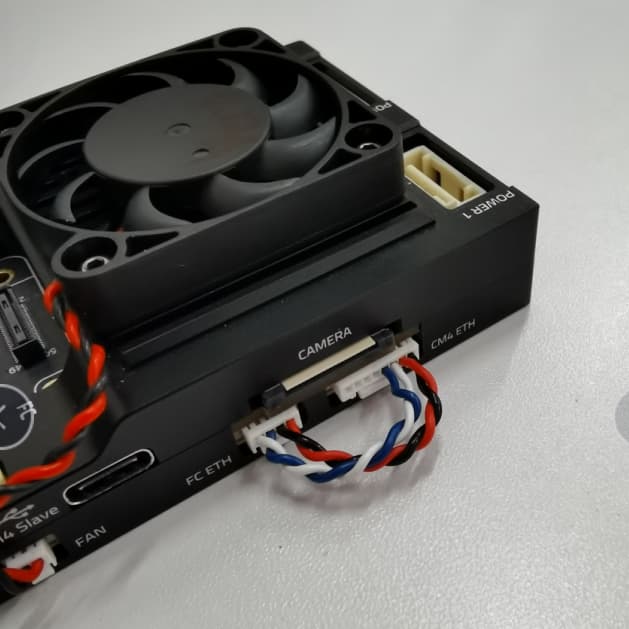
To set up a local ethernet connection between CM4/5 and the flight computer, the two ethernet ports need to be connected using a 8 pin to 4 pin connector.
The pinout of the cable is:
8-pin:\
1 A\
2 B\
3 C\
4 D\
5 (not connected)\
6 (not connected)\
7 (not connected)\
8 (not connected)
to 4-pin:\
1 B\
2 A\
3 D\
4 C
#### IP setup on CM4/5
Since there is no DHCP server active in this configuration, the IPs have to be set manually:\
First, connect to the CM4/5 via SSH by connecting to the CM4/5’s wifi (or use a Wifi dongle).\
Once the Ethernet cables are plugged in, the `eth0` network interface seems to switch from DOWN to UP.
You can check the status using:
```
ip address show eth0
```
You can also try to enable it manually:
```
sudo ip link set dev eth0 up
```
It then seems to automatically set a link-local address; for me, it looks like this:
```
ip address show eth0
2: eth0: mtu 1500 qdisc mq state UP group default qlen 1000
link/ether xx:xx:xx:xx:xx:xx brd ff:ff:ff:ff:ff:ff
inet 169.254.21.183/16 brd 169.254.255.255 scope global noprefixroute eth0
valid_lft forever preferred_lft forever
inet6 fe80::yyyy:yyyy:yyyy:yyyy/64 scope link
valid_lft forever preferred_lft forever
```
This means the CM4’s Ethernet IP is 169.254.21.183.
#### IP setup on FC
Now connect to the NuttX shell (using a console or the MAVLink shell), and check the status of the link:
```
ifconfig
eth0 Link encap:Ethernet HWaddr xx:xx:xx:xx:xx:xx at DOWN
inet addr:0.0.0.0 DRaddr:192.168.0.254 Mask:255.255.255.0
```
For me, it is DOWN at first.
To set it to UP:
```
ifup eth0
ifup eth0...OK
```
Now check the config again:
```
ifconfig
eth0 Link encap:Ethernet HWaddr xx:xx:xx:xx:xx:xx at UP
inet addr:0.0.0.0 DRaddr:192.168.0.254 Mask:255.255.255.0
```
However, it doesn’t have an IP yet. I’m going to set one similar to the one on the CM4/5:
```
ifconfig eth0 169.254.21.184
```
And check it:
```
ifconfig
eth0 Link encap:Ethernet HWaddr xx:xx:xx:xx:xx:xx at UP
inet addr:169.254.21.184 DRaddr:169.254.21.1 Mask:255.255.255.0
```
Now the devices should be able to ping each other.
Note that this configuration is ephemeral and will be lost after a reboot, so we’ll need to find a way to configure it statically.
#### Ping test
First from the CM4/5:
```
ping 169.254.21.184
PING 169.254.21.184 (169.254.21.184) 56(84) bytes of data.
64 bytes from 169.254.21.184: icmp_seq=1 ttl=64 time=0.188 ms
64 bytes from 169.254.21.184: icmp_seq=2 ttl=64 time=0.131 ms
64 bytes from 169.254.21.184: icmp_seq=3 ttl=64 time=0.190 ms
64 bytes from 169.254.21.184: icmp_seq=4 ttl=64 time=0.112 ms
^C
--- 169.254.21.184 ping statistics ---
4 packets transmitted, 4 received, 0% packet loss, time 3077ms
rtt min/avg/max/mdev = 0.112/0.155/0.190/0.034 ms
```
And from the FC in the NuttX shell:
```
ping 169.254.21.183
PING 169.254.21.183 56 bytes of data
56 bytes from 169.254.21.183: icmp_seq=0 time=0 ms
56 bytes from 169.254.21.183: icmp_seq=1 time=0 ms
56 bytes from 169.254.21.183: icmp_seq=2 time=0 ms
56 bytes from 169.254.21.183: icmp_seq=3 time=0 ms
56 bytes from 169.254.21.183: icmp_seq=4 time=0 ms
56 bytes from 169.254.21.183: icmp_seq=5 time=0 ms
56 bytes from 169.254.21.183: icmp_seq=6 time=0 ms
56 bytes from 169.254.21.183: icmp_seq=7 time=0 ms
56 bytes from 169.254.21.183: icmp_seq=8 time=0 ms
56 bytes from 169.254.21.183: icmp_seq=9 time=0 ms
10 packets transmitted, 10 received, 0% packet loss, time 10010 ms
```
#### MAVLink/MAVSDK test
For this, we need to set the mavlink instance to send traffic to the CM4/5’s IP:
For an initial test, we can do:
```
mavlink start -o 14540 -t 169.254.21.183
```
This will send MAVLink traffic over UDP to port 14540 (the MAVSDK/MAVROS port) on that IP, which means MAVSDK can just listen to any UDP arriving at that default port.
To run a MAVSDK example, install mavsdk via pip, and try out an example from [MAVSDK-Python/examples](https://github.com/mavlink/MAVSDK-Python/tree/main/examples).
For instance:
```
python3 -m pip install mavsdk
wget https://raw.githubusercontent.com/mavlink/MAVSDK-Python/main/examples/tune.py
chmod +x tune.py
./tune.py
```
---
# Agent Instructions
This documentation is published with GitBook. GitBook is the documentation platform designed so that both humans and AI agents can read, navigate, and reason over technical content effectively. Learn more at gitbook.com.
## Querying This Documentation
If you need additional information that is not directly available in this page, you can query the documentation by asking a question.
Perform an HTTP GET request on the following URL with the `ask` and `goal` query parameters:
```
GET https://docs.holybro.com/autopilot/pixhawk-baseboards/pixhawk-rpi-cm4-5-baseboard/ethernet-connection.md?ask=&goal=
```
`ask` is the immediate question: it should be specific, self-contained, and written in natural language.
`goal` is what the user is ultimately trying to achieve, the reason they need the answer. Sharing it helps GitBook give you a better, more relevant answer. A goal is most helpful when it describes the outcome the user wants rather than restating the question. For example, with `ask=how do I create an API token`, a goal like `automate deployments from our CI pipeline` lets GitBook tailor the answer to that use case.
The response will contain a direct answer to the question and relevant excerpts and sources from the documentation.
Use this mechanism when the answer is not explicitly present in the current page, you need clarification or additional context, or you want to retrieve related documentation sections.